Updated 21 October 2026. Every size re-checked against Etsy's own help articles today; sources at the end. Where Etsy doesn't publish a number, we say so and label our own recommendation.
Etsy publishes exact pixel sizes for banners, logos, profile pictures and listing photos, but they're spread across several help articles. Here is every Etsy image size in one place, answer first.
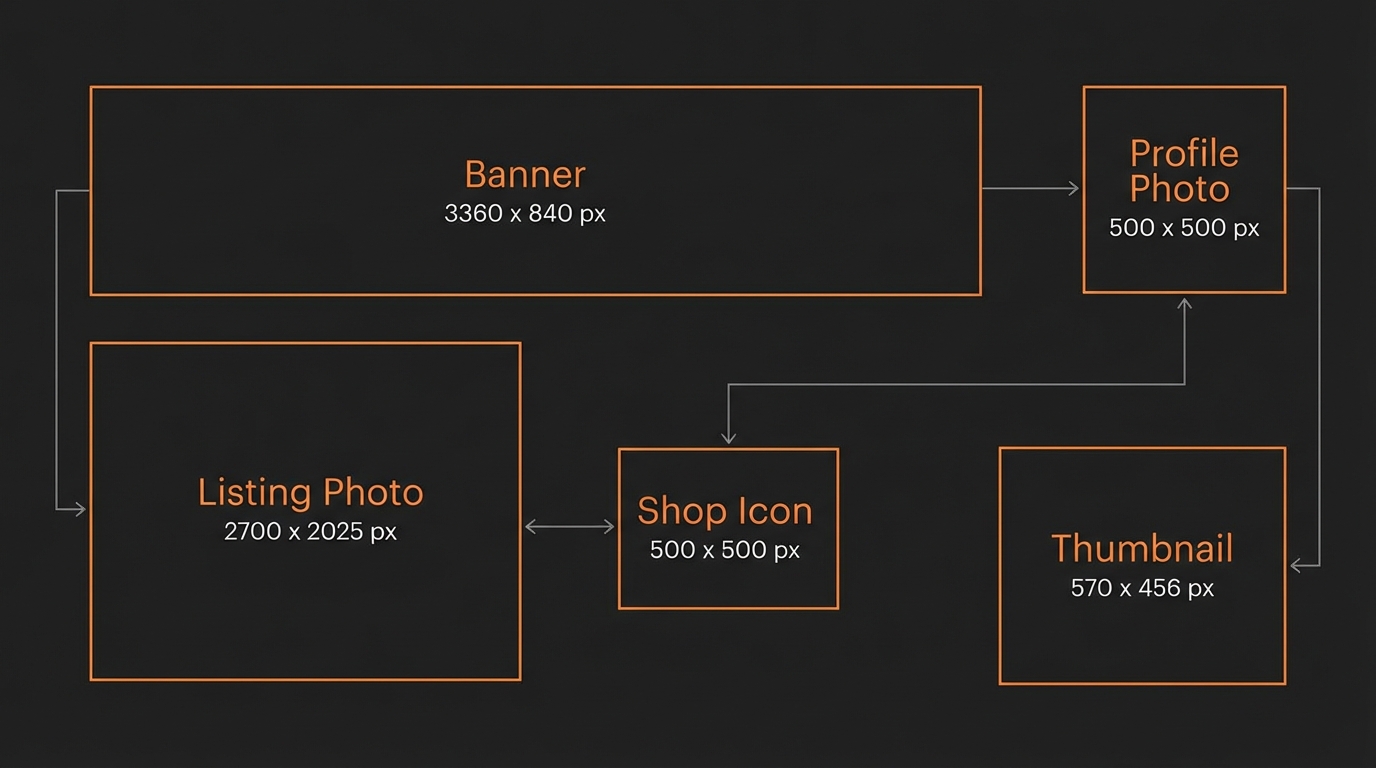
Etsy banner size: the big shop banner is 1200 x 300px minimum, and Etsy recommends 1600 x 400px (4:1). Etsy logo / shop icon size: 500 x 500px (square). Etsy listing photo and thumbnail size: at least 2000px wide and tall; the thumbnail is an automatic crop of your first photo, which must be at least 635 x 635px.
Bookmark this page — or run your files through the Etsy Image Resizer and skip the manual math entirely.
Etsy Image Sizes: Quick Answer Table
| Image type | Size | Aspect ratio | File size / format |
|---|---|---|---|
| Big shop banner | 1600 x 400px recommended 1200 x 300px minimum | 4:1 | JPG, PNG, GIF, SVG or HEIC |
| Mini shop banner | 1600 x 213px recommended 1200 x 160px minimum | about 7.5:1 | JPG, PNG, GIF, SVG or HEIC |
| Logo (shop icon) | 500 x 500px recommended | 1:1 | JPG, PNG, GIF, SVG or HEIC |
| Profile picture | 400 x 400px minimum | 1:1 (must be square) | Under 10MB; JPG, PNG or GIF |
| Listing photo | 2000px or more on width and height | Landscape or square (Etsy prefers landscape) | Files over 1MB may not finish uploading |
| First photo / thumbnail | 635 x 635px minimum | Cropped automatically to square, portrait and landscape | No separate upload |
| Listing video | 500px minimum, 1080px or more ideal | 2:1 or 1:2 | Up to 100MB; MP4, MOV and others; 2 per listing |
| Order receipt banner | 760 x 100px minimum | 7.6:1 | JPG, PNG, GIF, SVG or HEIC |
Jump straight to resizing your photos to these exact dimensions or cropping your shop banner and icon without doing the math by hand.
All figures come from Etsy's Help Center (listed under Sources at the end), checked 21 October 2026. Etsy also says animated GIFs and transparent PNGs aren't supported: transparent areas show up black.
Etsy Banner Size (2026)
The Etsy banner size is 1200 x 300px minimum for the big shop banner, and Etsy recommends 1600 x 400px, a 4:1 ratio. These are the Etsy banner dimensions most people mean by "Etsy shop banner size": the wide image across the top of your shop home, shown on desktop and on mobile.
| Specification | Value |
|---|---|
| Etsy's minimum | 1200 x 300px |
| Etsy's recommended size | 1600 x 400px |
| Aspect ratio | 4:1 |
| Optional larger upload (our suggestion) | 3360 x 840px, same 4:1 ratio, for extra sharpness on high-density screens |
Etsy compresses banners on upload either way, so the recommended 1600 x 400px is enough for most shops. Use the Etsy Banner Size tool to crop straight to either size without doing the math by hand.
Keep your shop name and any text inside the center 60% of the banner. The banner is shown at different widths on different screens, and text near the left and right edges is the first thing to get cut off.
Mini Banner Size
The Etsy mini banner is 1200 x 160px minimum, and Etsy recommends 1600 x 213px. It's a slim strip for shops that want a subtler header. Etsy also lets you pick "None", which moves your listings higher up the page and makes your logo the main branding. Carousel (1200 x 300px recommended) and collage banners are only available with Etsy Plus.
Etsy Shop Logo / Icon Size
The Etsy logo size is 500 x 500px, Etsy's recommendation for the square image next to your shop name. Etsy now calls it your "Logo"; many sellers still say "shop icon" or "Etsy icon", and it's the same image.
Etsy notes that a shop without a logo may get less visibility in search, so don't leave it blank. A good logo looks right both big and small: simple graphics, short text, no busy background. Our practical tip: keep the important part of the logo inside the middle 80% of the square, since it shows small and can be displayed with rounded edges.
Etsy Profile Picture Size
The Etsy profile picture size is at least 400 x 400px, square, and smaller than 10MB. This is a separate image from your shop logo: it belongs to your account's public profile (Account settings → Public profile).
- Square only: Etsy says a non-square original will look distorted.
- Formats: .jpg, .png or .gif only.
- No delete: you can't remove a profile picture, only replace it.
Etsy Listing Photo Size
The Etsy listing photo size Etsy recommends is at least 2000 pixels on both width and height, and you can add up to 20 photos per listing. Below 2000px, the zoom on the listing page looks soft, which matters for anything where texture counts (fabric, paper, engraving, jewelry).
| Specification | Value |
|---|---|
| Recommended size (Etsy) | 2000px or more, width and height |
| Our recommended export | 3000 x 2250px (4:3 landscape), or 2000 x 2000px if your product only works square |
| First photo minimum (Etsy) | 635 x 635px, or it may show lower in search |
| File size | Files over 1MB may not finish uploading on slower connections |
| Photos per listing | Up to 20 |
| Accepted formats | .jpg, .gif, .png, .svg, .heic (no animated GIF, no transparency) |
| Color profile | sRGB (Etsy converts images to sRGB) |
Landscape beats square for the first photo. Etsy says the first photo should be horizontal or square, and its thumbnail guidance goes further: upload horizontal images and avoid square crops. Your first photo also sets the shape of the photos that follow, so keep all photos the same shape.
Export at 3000 x 2250px at 80-85% JPEG quality. That usually lands under 1MB with no visible quality loss, so uploads finish quickly and you keep headroom for Etsy's own compression.
What about DPI? Etsy's photo requirements are all in pixels; the DPI value stored in a file doesn't change how sharp it looks on a screen. If a print shop or print-on-demand provider asks for 300 DPI, you can change the DPI value here without touching the pixels.
Etsy Thumbnail Size
There is no separate Etsy thumbnail size to upload: the thumbnail is a cropped version of your first listing photo, and that photo needs to be at least 635 x 635px (2000px or more is better). Etsy doesn't publish a pixel size for the thumbnail itself. It crops the same photo to square, portrait and landscape shapes depending on where a shopper sees it.
- Shoot wider than you think: leave a border around the product so every crop still shows all of it.
- Center the subject: Etsy recommends keeping the most important part in the center.
- Use "Adjust thumbnail": the listing editor lets you set and preview the crop. You can also test it first with our Etsy thumbnail crop preview.
- Keep text off the edges: that's exactly what a square or portrait crop removes first.
More on choosing that first image: how to pick an Etsy thumbnail that gets clicks.
Product mockups put the design in the middle of the frame by default, which is exactly what survives Etsy's thumbnail crops. If you're generating mockups for your first photo, keep the product large and centered in the template rather than off to one side.
Etsy Cover Photo Size
Etsy doesn't have a "cover photo" in its current shop design. What people usually mean is the big shop banner: 1600 x 400px recommended, 1200 x 300px minimum. If you want a slimmer header, use the mini banner (1600 x 213px recommended), or choose no banner and let your logo carry the branding.
Etsy Listing Video Size and Length
Etsy listing videos should have a 2:1 or 1:2 aspect ratio, be up to 15 seconds long and under 100MB, and you can add 2 per listing. Etsy removes the sound once uploaded.
| Specification | Value |
|---|---|
| Length | Up to 15 seconds (Etsy's help articles give 3 or 5 seconds as the minimum, so aim for 5-15) |
| Resolution | 500px minimum, 1080px or more ideal |
| Aspect ratio | 2:1 (landscape) or 1:2 (portrait) |
| Max file size | 100MB |
| Formats | MP4, MOV, FLV, AVI, 3GP, MPEG and other common formats |
| Audio | None: sound is removed on upload |
| Videos per listing | 2 |
A silent, well-lit product video doesn't need to be complex — a slow pan across the product, or a quick size-comparison clip, both fit inside 15 seconds. See our guide on turning a mockup into an Etsy listing video if you don't have physical product footage yet.
Using All 20 Photo Slots (and Both Video Slots)
Etsy allows up to 20 photos and 2 videos per listing, and most sellers use far fewer. A framework that covers the full set without padding:
- Photo 1 (thumbnail): hero shot — clean, centered mockup on a simple or lifestyle background
- Photo 2-3: the product in context/in use
- Photo 4-5: close-up detail shots (texture, print quality, finish)
- Photo 6: size or scale reference next to a familiar object
- Photo 7-9: color, size or frame variation options, if you offer them
- Photo 10: packaging or exactly what arrives in the box
- Photo 11-14: additional angles or a second/third room or lifestyle setting
- Photo 15: an infographic with key dimensions or specs
- Photo 16-20: more variety — different mockup styles, a flat-lay, a different color palette. Only add photos here if they're genuinely different information, not filler.
- Video 1-2: a 5-15 second product video (see the video spec above) — a slow pan or a size comparison works well and doesn't need editing software.
If you sell print-on-demand products, generate the mockup-based photos (1, 2-3, 6, 11-14, 16-20 in the list above) as a single batch from the Scaylr template library instead of one at a time — pick a handful of scenes per listing and let the batch generator produce every combination.
Etsy Image Checklist Before You Upload
- Resolution: listing photos at least 2000px wide and tall (first photo never below 635 x 635px)?
- File size: under 1MB? If not, drop JPEG quality to 80-85%.
- Thumbnail test: does photo #1 still work cropped square, portrait and landscape?
- Logo and profile picture: logo 500 x 500px, profile picture at least 400 x 400px, both square and centered?
- Banner: 1600 x 400px (big) or 1600 x 213px (mini), text inside the center 60%?
- Format: JPG for photos; no transparent PNGs (transparency turns black) and no animated GIFs.
- Color profile: sRGB, not CMYK.
- Slots used: are you using more than a handful of the 20 photo and 2 video slots?
Run a whole batch through the Etsy Image Resizer to hit these dimensions automatically, or see the best mockup generators for Etsy sellers if your photos are still coming from a phone camera instead of mockups. For everything beyond size, use the Etsy listing photos checklist.
Create Etsy-Ready Images in One Batch
Resize a whole folder of listing photos to Etsy's exact dimensions, or generate the mockups from scratch — no Photoshop needed.
Try Scaylr Free →Frequently Asked Questions
Sources (checked 21 October 2026): Etsy Help: Requirements and best practices for images (banners, logo, profile photo, listing photos, formats) · How to customize your shop's appearance (banner styles, logo) · Your bio and profile picture · How to create a listing (20 photos, 2 videos) · How to edit your listing photos (thumbnail) · How to add listing videos.
If Etsy changes a spec, let us know and we'll update this page.