
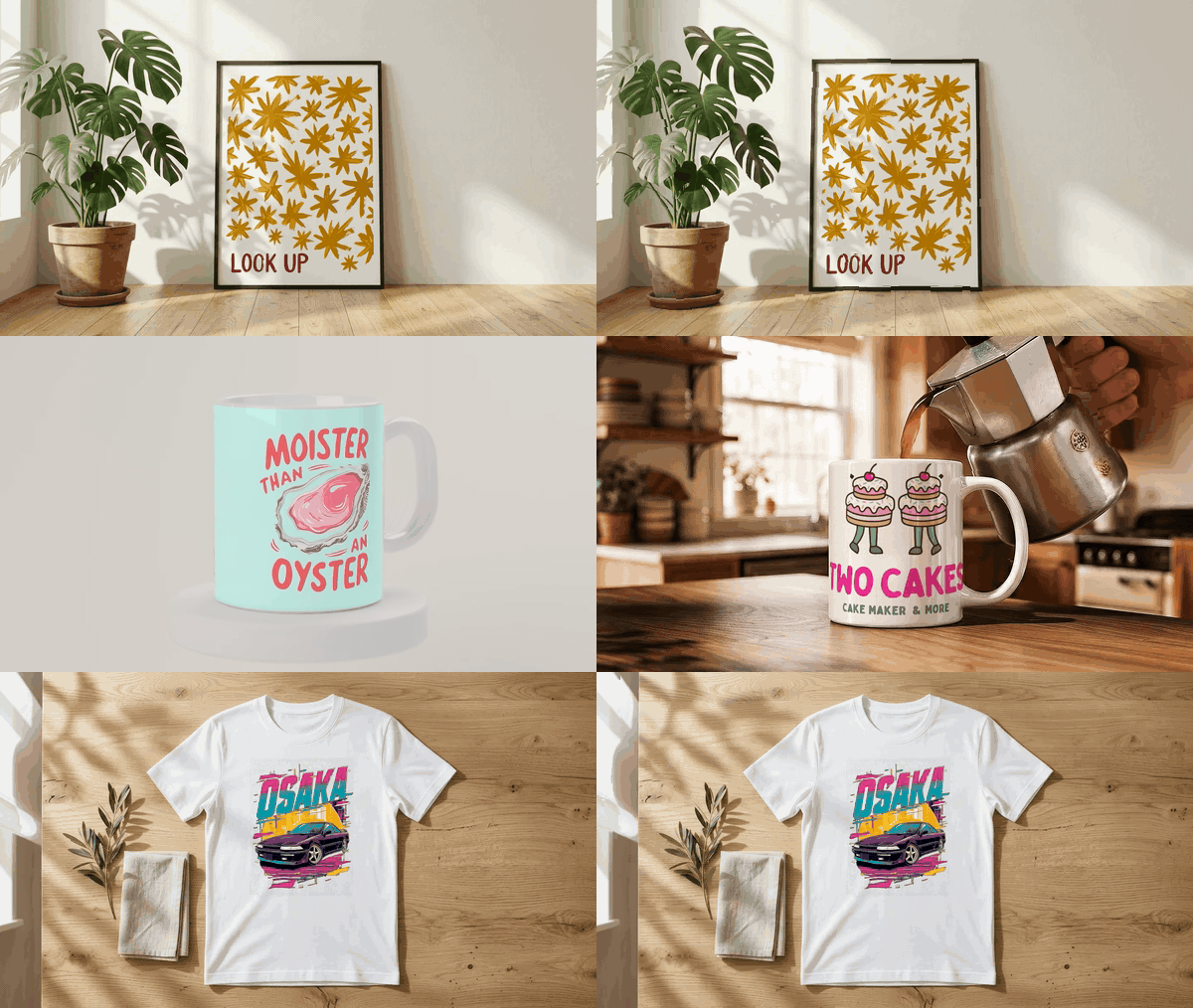
Etsy listing videos must be 3-15 seconds, under 100 MB, and Etsy strips the audio no matter what you upload — so a silent, animated product video isn't a compromise, it's exactly what the format wants. Scaylr's video mockup tool turns a design into one of these in a couple of minutes: pick a scene (a poster in a sunlit room, a mug on a café table, a t-shirt laid flat), drop in your artwork, and export an MP4 that already fits Etsy's spec. Free to try — 20 watermarked videos a day with a free account, unlimited with Pro.
Etsy has let sellers add video to listings for a while now, and it works: buyers who see something move on a product page get a better feel for scale, texture and colour than a static photo gives them. The catch is that most Etsy sellers making wall art, mugs or apparel through print-on-demand don't have a physical product in hand to film. You can't point a camera at a poster that only exists as a PNG on your laptop.
A mockup video solves that from the other direction: instead of filming a real product, you animate a photorealistic scene around your design. The light moves across the print, the frame catches a shadow, the mug sits under café steam, and the file that comes out the other end already matches what Etsy expects.
What Etsy Actually Requires From a Listing Video
Before making anything, it's worth reading the actual rules instead of guessing. Etsy's own help article, How to Add Listing Videos, lays them out directly:
| Requirement | Etsy's spec |
|---|---|
| Length | 3-15 seconds |
| Max file size | 100 MB |
| Videos per listing | 2 |
| Resolution | 500px minimum, 1080px+ recommended |
| Aspect ratio | 2:1 or 1:2 |
| Audio | Removed automatically — Etsy videos are always silent |
| Accepted formats | MP4, MOV, FLV, AAC, AVI, 3GP, MPEG |
Two details matter more than they look. First, Etsy strips the audio from every video on upload, no exceptions — so a video you never recorded sound for isn't missing anything a buyer would notice. Second, the 3-15 second window is short by design: this isn't a product demo, it's a few seconds of movement that makes a static listing feel alive. That's exactly the length a mockup scene is built to run.
Etsy's help page states 2:1 or 1:2 as the official ratio, but in practice most sellers upload square (1:1) or portrait video and Etsy displays it fine inside the listing gallery — the main technical wall is length and file size, not the exact ratio. If you're also planning to reuse the clip on Instagram or TikTok, export a 4:5 or 9:16 version instead and keep the square one for Etsy.
Why a Mockup Video Beats Waiting for a Camera
For a physical product seller, video means setting up a tripod, dealing with lighting, and re-shooting every time a new colourway launches. For a print-on-demand or digital-download seller, there's usually no physical unit sitting on a desk at all — the "product" is a file that gets printed to order later.
A mockup video sidesteps both problems. The scene (the room, the light, the surface) is already filmed or rendered once; your design just gets composited into it. That means:
- No product in hand required. List a design the same day you finish it, video included.
- Every colourway gets a video for free. Swap the design file, re-render, done — no reshoot.
- Consistent lighting and framing across your shop. Every listing that uses the same scene looks like it belongs to the same brand.
How to Make an Etsy Listing Video With Scaylr
Scaylr's video mockup tool works the same way the photo mockup studio does, just with a moving scene instead of a still one, and it's free to try.
Pick a scene
Choose from the live scene library — more than 30 scenes covering posters and frames, mugs, tumblers, tote bags, t-shirts, greeting cards, canvas prints, throw pillows and desk mats. Scenes range from a walnut-frame poster catching afternoon light to a mug being filled with coffee. Browse the full set at /video-mockups, or jump straight to one like the coffee pour mug scene or the black-frame poster with a mat.
Drop in your design
Upload a PNG, JPG or WEBP of your artwork. The tool warps and lights it to match the scene automatically — no manual perspective work.
Pick a crop and export format
Choose 16:9 (widescreen, for YouTube or a website), square (Etsy and Instagram feed), 4:5 (Instagram portrait) or 9:16 (Reels, TikTok, Shorts, Pinterest), then export as a silent MP4 (H.264) or a looping GIF.
Upload it to your listing
Go to Shop Manager → Listings → your listing → Photo and video, and drop the file in. Because the scene runs 8 seconds, the export already lands inside Etsy's 3-15 second window without any trimming.
What's Free and What Needs a Plan
Video mockups are free to try, with limits that scale up as you upgrade:
| Plan | Videos | Watermark | Price |
|---|---|---|---|
| Signed out | 5 / day | Watermarked | $0 |
| Free account | 20 / day | Watermarked | $0 |
| Starter | 50 / month | No watermark | $9.99/mo |
| Pro | Unlimited | No watermark | $17.99/mo |
Signing in for a free account alone quadruples your daily allowance versus staying signed out (20 a day instead of 5), and lifts the watermark entirely once you're on Starter or Pro.
Getting the File Etsy-Ready if It's Too Big or the Wrong Shape
Mockup exports from Scaylr are already sized correctly, but if you're working with a video from another source — a screen recording, a phone clip, an AI-generated video — it may need adjusting before Etsy will accept it. Three free tools handle that:
- Video Compressor — brings a file under Etsy's 100 MB limit without a visible quality hit.
- Resize Video — crops to square, vertical or landscape for Etsy, Reels or TikTok.
- Video to GIF — turns a clip into a looping GIF for use outside the listing itself (emails, social, Pinterest).
All three run in the browser — nothing gets uploaded to a server — and are listed with the rest of Scaylr's free seller tools.
Video counts toward Etsy's total media slots alongside photos, but it's a separate 2-video allowance on top of your 20 photo slots. Use your first photo for the strongest static thumbnail (thumbnails are still built from photos, not video — see our Etsy image size guide for exact thumbnail crops), then place the video second or third so it plays as buyers scroll into the gallery rather than replacing your best still shot.
If you're selling print-on-demand designs on Etsy and don't have a physical product to film, a mockup video is the realistic way to add video to a listing today. It fits Etsy's length and size rules without editing, costs nothing to try, and takes minutes per design once you've picked a scene you like.
Make Your First Listing Video Free
Pick a scene, drop in your design, and download an Etsy-ready MP4 in minutes.
Try Video Mockups Free →Frequently Asked Questions
Etsy's video requirements checked directly against Etsy's official Listing Videos help page on 29 September 2026. Scaylr plan limits checked against the live app on the same date.