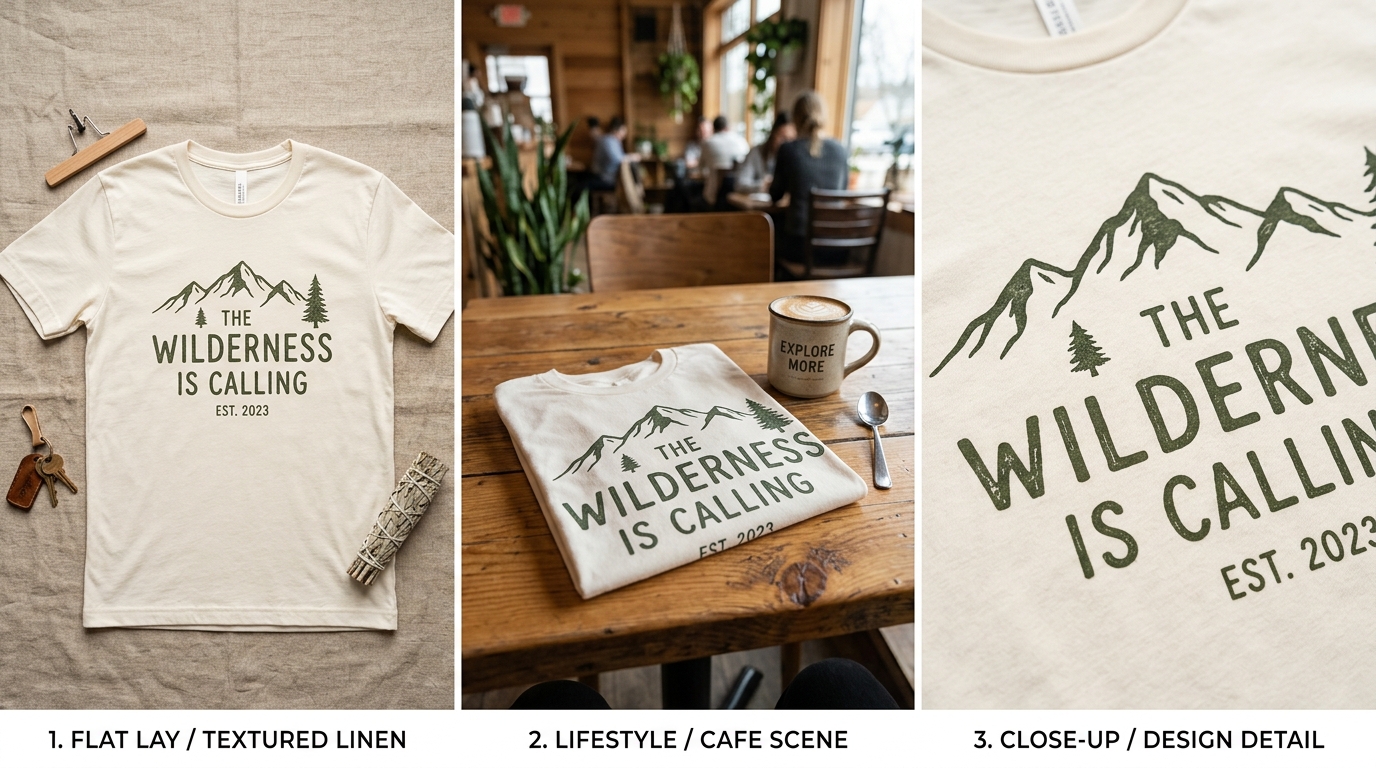
The three main t-shirt mockup types serve different purposes. Flat lays show the design clearly and work well for text-based shirts. Lifestyle shots show the shirt in context and convert better for fashion-forward designs. Model shots are the highest-converting format when done well, but the hardest to produce consistently. Most successful POD listings use a combination rather than one type alone.
Your t-shirt design matters. The mockup that presents it matters just as much. Buyers on Etsy and Redbubble cannot touch the product before buying, which means the images you provide are doing all the work that a physical store does: showing fit, communicating quality, making the design look like something worth owning.
The type of mockup you choose affects click-through rate, conversion rate, and the kind of buyer you attract. Here is how each format works and when to use it.
Flat lay mockups
A flat lay t-shirt mockup shows the garment laid out on a surface, viewed from directly above. The shirt is unfolded and smooth, the design is fully visible, and there are no distractions from styling or body shape.
Flat lays are the best format for one specific purpose: showing the design itself as clearly as possible. For text-based shirts, quote prints, and designs with fine detail that could be lost in a lifestyle context, a flat lay gives buyers an accurate view of exactly what they are ordering.
The weakness of flat lays is that they look generic. Every seller on the platform can produce the same flat lay in five minutes. A grid of flat lay listings all look identical in search results, which makes it harder to stand out on the click-through stage. Flat lays work better as the second or third image in a listing set than as the lead image.
Surface choice matters more in flat lays than it does in other formats. A white background is clean but clinical. A wood grain surface, a linen fabric background, or a concrete texture adds texture and warmth without distracting from the design.
Use a flat lay as your second or third listing image to show design clarity, especially if your lead image is a lifestyle shot that crops the design for mood rather than legibility. Buyers who are deciding whether to buy need to see exactly what the print looks like, and a flat lay delivers that without ambiguity.
Lifestyle mockups
A lifestyle mockup places the shirt in a real-world scene. This might be a folded shirt on a coffee shop table, a shirt hanging on a clothes rail in a minimal wardrobe, or a styled flat lay with complementary props like sunglasses, a tote bag, and a plant.
Lifestyle mockups create aspiration. They show the shirt as part of a world the buyer wants to inhabit, not just as a garment on a surface. For fashion-forward designs, niche identity shirts (dog mum, plant parent, specific hobby or profession), and anything where the buyer is purchasing an identity as much as a product, lifestyle context is what triggers the emotional response that leads to a purchase.
The challenge with lifestyle mockups is that the props and scene can compete with the shirt for attention. The design needs to remain readable and prominent even when surrounded by styling elements. If the mockup is so well-styled that buyers look at the whole image without registering the specific design, the image has failed.
Background colour is worth deliberate thought. A dark shirt in a dark room disappears. A bright print against a busy prop arrangement becomes noise. The best lifestyle mockups keep the shirt as the clearest visual anchor in the frame, with styling elements supporting rather than competing.
Model shots
A model shot shows the shirt worn on a person. It communicates fit, fabric drape, and how the design sits on an actual body — none of which a flat lay or styled scene can convey.
Model shots are the highest-converting format for t-shirts when the model, background, and composition are right. Buyers want to know how it will look on them, and a model provides the closest approximation available in a digital listing.
The difficulty is consistency and quality. A poorly lit model photo, an awkward pose, or a background that clashes with the design does more damage than a good flat lay. Model shots require either a professional shoot, a high-quality print-on-demand mock-up service that uses real models, or a generative model platform that can produce photorealistic results.
For Etsy sellers who cannot produce physical model shots, several mock-up services offer model images using print-on-demand integration: Printful and Printify both generate model mockups automatically when you create a product. These are consistent and professional enough to use as lead images, though they lack the distinctiveness of a custom shoot.
Diversity matters in model selection. Buyers come in all shapes, sizes, and skin tones, and seeing only one body type modelling a shirt is a missed opportunity to connect with buyers who might not see themselves in the listing. Platforms that provide multiple model options are worth using rather than defaulting to a single template.
Building a complete listing image set
The strongest t-shirt listings combine all three formats in a deliberate sequence. A typical high-performing set looks like this:
The lead image is whichever type is strongest for the specific shirt. For a fashion-forward design targeting a niche identity audience, that is usually a lifestyle or model shot. For a detailed text design where legibility is the primary concern, a clean flat lay on a good surface can work as a lead if it is genuinely the clearest way to show the design.
The second and third images expand the view. If the lead was a lifestyle shot, the second image might be a flat lay showing the full design, and the third might be a close-up crop of the print detail. If the lead was a flat lay, the second image should add context: a styled room setting or a model shot.
The fourth image typically handles size and colour information. A graphic showing the available colours side by side, or a size chart image, reduces buyer uncertainty and is worth including in any listing that comes in multiple variants.
Test your lead image by looking at it at thumbnail size — roughly the size it appears in Etsy search results on mobile. If the design is not readable, or if the shirt does not visually pop from the background, the image will not drive clicks even if it looks excellent at full size. Most buyers make click decisions at thumbnail scale.
Resolution and format requirements
Etsy requires a minimum of 2000 pixels on the long edge for the zoom feature to activate. Below that threshold, buyers cannot zoom in to check print quality, which increases uncertainty and reduces conversion. Aim for at least 2000px; 3000px is better.
File format: JPEG is standard for mockup images. PNG is fine but produces larger files that can slow listing load times. JPEG at 85-90% quality is visually indistinguishable from lossless and keeps file sizes reasonable.
Colour accuracy matters more for apparel than for wall art. Buyers are sensitive to colour mismatches in clothing. Make sure the background colour of your mockup does not introduce a colour cast that shifts how the garment colour reads. A white shirt against a warm cream background will read as off-white in the listing, which creates returns if the buyer expected bright white.
Generating mockups without Photoshop
Most POD sellers do not use Photoshop for their t-shirt mockups, and they should not need to. Browser-based mockup tools handle the smart object replacement that Photoshop does manually, without requiring software installation or a monthly Creative Cloud subscription.
For wall art, posters, and phone cases, Scaylr runs your designs through multiple templates at once and downloads the full set as a zip. For apparel-specific mockups, the free template library has flat lay and styled options that produce listing-ready images at the correct resolution. The batch generation approach means a full set of images for a launch takes minutes rather than an afternoon.
Prefer video? Watch the 16-minute walkthrough: starting a T-shirt shop on Etsy from zero.
For a broader look at how mockup type affects listing performance across different product categories, the complete mockup guide for Etsy covers the strategy across all product types.
No single mockup type is best for every t-shirt. Flat lays show design detail clearly. Lifestyle shots create context and aspiration. Model shots communicate fit. The listings that perform best use all three in a deliberate sequence: the lead image earns the click, subsequent images answer the questions that lead to a purchase. Producing all three used to require significant effort. With the right tools it takes roughly the same time as producing just one.
Generate your full t-shirt listing image set in minutes
Upload your design, select your templates, and download flat lay and styled mockups ready to upload to Etsy or any POD platform.
Try Scaylr Free →